
شاشة بيضاء
جميع الشاشات الشائعة
شاشات المقالب والشاشات الوهمية وشاشات أنظمة التشغيل
شاشات المقالب عبر الإنترنت
شاشات وهمية عبر الإنترنت
شاشات أنظمة التشغيل عبر الإنترنت
فيديو طويل بشاشة بيضاء

ما هي الشاشة البيضاء؟
تُعد شاشة بيضاء أداةً عبر الإنترنت تساعد المستخدمين على إخفاء محتوى الشاشة عن الآخرين أثناء العمل على مهام خاصة. وتتميز هذه الأداة بمزايا عديدة أخرى تتصدرها: فحص البكسلات التالفة (dead pixels)، وخاصية التكبير (Zoom)، ومراقبة الشاشة. تتيح الأداة تحويل الشاشة بالكامل إلى اللون الأبيض، مما يسهل عليك تنظيف شاشة الحاسوب المكتبي أو المحمول. كما يمكنك استخدامها لتنزيل صور للشاشة البيضاء بأي أبعاد أو دقة تختارها. ويتمثل الهدف الأساسي للأداة في مساعدة المستخدمين في مختلف الجوانب، بدءاً من التنظيف ووصولاً إلى إصلاح الشاشة. علاوة على ذلك، يمكنك الاستفادة من هذه الأداة لتوفير إضاءة احترافية أثناء مكالمات الفيديو أو عند التقاط الصور، حيث تساهم الإضاءة البيضاء الإضافية في تحسين جودة الصور ومقاطع الفيديو.
سواء كنت تستعد لاجتماع عبر منصة “Zoom” أو ترغب في فحص شاشتك بحثاً عن الغبار أو أي شوائب أخرى تتطلب التنظيف، فإن أداة شاشة بيضاء (الشاشة البيضاء) هي الخيار الأمثل لك. إنها أداة مثالية تلبي احتياجاتك في حالات متعددة؛ بدءاً من توفير الإضاءة اللازمة للأعمال الإبداعية -مثل التصوير الفوتوغرافي أو تصوير الفيديو- ووصولاً إلى فحص الشاشة بحثاً عن البكسلات الميتة أو العالقة، أو تحسين الإضاءة أثناء اجتماعات “Zoom”، أو حتى إنشاء خلفية نقية ومركزة. إنها أداة مجانية توفر شاشة بيضاء صافية وخالية تماماً من الإعلانات، مما يضمن لك الحصول على نتائج مثالية.
أبرز الميزات

لا توجد إعلانات على الشاشة عند فتحها.

يمكنك التحقق من وجود وحدات بكسل تالفة على شاشة العرض الخاصة بك.

يساعد كثيراً في التصوير الفوتوغرافي الاحترافي من خلال توفير أفضل إضاءة.
كيفية استخدام أداة الشاشة البيضاء من موقع whitescreen.to؟
استخدام هذه الأداة سهل وبسيط للغاية، ويمكنك تعلم كيفية استخدامها من خلال الخطوات الموضحة أدناه.
- افتح الموقع الرسمي
افتح موقع الشاشة البيضاء (https://whitescreen.to/)
- اختر اللون أو حدد الشاشة
يمكنك استخدام اللون الأبيض الافتراضي أو أي شاشة أخرى تريدها.
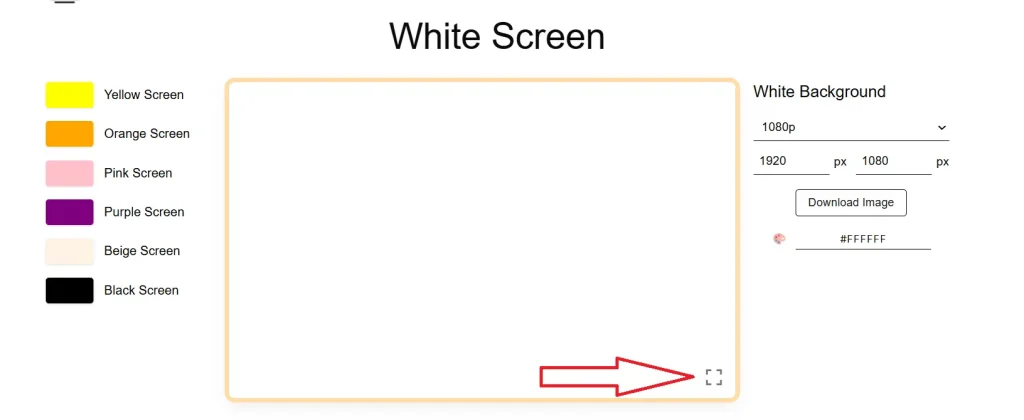
- الدخول إلى وضع ملء الشاشة
انقر أو اضغط على أيقونة “ملء الشاشة” في أداة الشاشة البيضاء شاشة بيضاء، وستتحول شاشتك بالكامل إلى اللون الأبيض. والآن، أنجز مهامك المطلوبة باستخدام هذه الأداة الرائعة.
- الخروج من الأداة
بعد الانتهاء من العمل، اضغط على زر “Esc” في لوحة المفاتيح أو على زر الرجوع في جهازك الذي يعمل بنظام Android أو iOS للخروج من وضع ملء الشاشة.
- استخدام شاشات أخرى
هناك العديد من الشاشات الوهمية وشاشات المقالب الأخرى التي يمكنك استخدامها لتعزيز خصوصيتك وإخفاء ما تقوم به على الشاشة عن أي شخص.
كيفية تنزيل شاشة بيضاء؟
إلى جانب استخدام هذه الأداة عبر الإنترنت، يمكنك أيضاً تنزيل صورة باللون الأبيض أو بأي لون آخر تريده.
- افتح الموقع الإلكتروني
أولاً، افتح متصفح الويب وانتقل إلى الموقع الرسمي لـ White Screen (whitescreen.to).
- اختر اللون
يمكنك اختيار اللون الأبيض كلون أساسي، ولكن تتوفر على هذه المنصة أيضاً العديد من الألوان المساندة التي يمكن أن تساعدك في جوانب أخرى إذا كنت بحاجة إلى ألوان مختلفة.
- اختر جودة الصورة
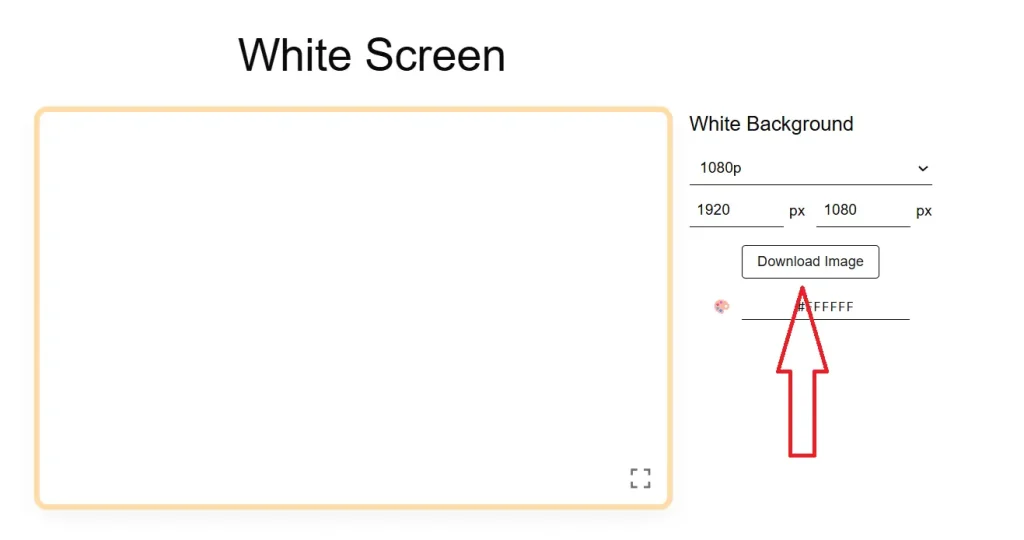
اختر جودة الصورة من المربع الموجود على الجانب الأيمن من الشاشة لتنزيلها. تتوفر خيارات متعددة للجودة، تتراوح بين 1080p و4K وصور مخصصة للهواتف المحمولة. بعد تحديد الجودة، انقر على زر التنزيل للحصول على الصورة ذات الخلفية البيضاء.
- تنزيل مخصص
يمكنك أيضاً تحديد دقة مخصصة ولون مخصص لتنزيل صورة بأي أبعاد أو أي لون وبجودة عالية الدقة (HD).
لماذا يستخدم الناس شاشة بيضاء؟
هناك أسباب عديدة لاستخدام الناس له. وفيما يلي ذُكرت أكثر هذه الأسباب شيوعاً.
شاشة بيضاء لنسخ الرسومات
يستخدمه الناس لنقل الرسومات؛ إذ يضعون الورقة الأصلية على شاشة ذات خلفية بيضاء تتيح لهم رؤية المزيد من تفاصيل الصورة، مما يسهّل عليهم عملية نقل الرسومات.
نظِّف شاشة الشاشة أو الحاسوب المحمول
يساعد ذلك المستخدمين على تنظيف الشاشة؛ إذ تتيح الخلفية البيضاء رؤية أي بقع أو آثار موجودة بوضوح، مما يسهّل عملية التنظيف ويجعلها أكثر دقة.
لوضع التركيز
عندما يحتاج المرء إلى العمل بتركيز تام ودون أي مشتتات، فإنه يستخدم اللون الأبيض كخلفية؛ لذا تُعد هذه الأداة رائعة ومفيدة للغاية لمن يحتاجون إلى تركيز عالٍ جداً على أمر ما.
كمصدر للضوء
يمكن أيضاً استخدام “الشاشة البيضاء” كمصدر للضوء؛ فعندما يقوم الأشخاص بأعمال مثمرة ويحتاجون إلى إضاءة ساطعة إضافية، يمكنهم الاستعانة بهذه الأداة للحصول على مزيد من الضوء.
لإضاءة اجتماعات Zoom
تُعد هذه الأداة مفيدة للغاية لاجتماعات Zoom أو Google Meet؛ إذ يستخدمها الأشخاص لجعل ملامح وجوههم أكثر إشراقاً ووضوحاً وتأثيراً، مما يغير الانطباع العام للاجتماع أو العرض التقديمي.
لاختبار البكسلات / فحص الشاشة
تُعد أداة “White Screen Tool” مفيدة للغاية لفحص وحدات البكسل في شاشة الحاسوب المكتبي أو المحمول؛ فإذا كانت هناك أي وحدات بكسل تالفة أو عالقة في شاشتك، يمكنك استخدام هذه الأداة لتحديد الموقع الدقيق للمشكلة.
عرض شاشة فارغة
يستخدم الأشخاص هذه الأداة أيضاً لإخفاء ما يعملون عليه دون إغلاق جهاز الكمبيوتر أو الحاسوب المحمول؛ إذ يكتفون بعرض شاشة بيضاء بوضع ملء الشاشة لإخفاء العمل الجاري في الخلفية، دون الحاجة إلى تصغير النوافذ أو إيقاف تشغيل الشاشة.
استخدم الشاشة البيضاء لقراءة الكتب
في غرفة يملؤها الناس، يستخدم معظمهم هذه الأداة كمصدر ضوء صغير وذكي لقراءة الكتب دون التأثير على الإضاءة العامة للغرفة.
للمكياج
تُعد الشاشة البيضاء المتاحة عبر الإنترنت مفيدة أيضاً عند وضع المكياج؛ إذ توفر للمستخدمات إضاءةً نقيةً وواضحةً، مما يتيح لهن الحصول على أفضل النتائج من مستحضرات التجميل بأقل قدر من الجهد.
لإنشاء المحتوى
لقد أصبح إنشاء محتوى الفيديو أمراً في غاية السهولة أيضاً بفضل هذه الأداة؛ إذ لم يعد الناس بحاجة إلى شراء مصادر إضاءة إضافية باهظة الثمن، بل بات بإمكانهم استخدامها كمصدر للضوء لإنتاج مقاطع فيديو داخلية مذهلة لمنصتي “يوتيوب” و”تيك توك”.
شاشة بيضاء لإنشاء دفتر قلّاب (Flipbook)
تُعد هذه الأداة مفيدة للغاية لإنشاء دفتر رسوم متحركة (Flipbook)؛ إذ تتيح للمستخدمين وضع أي محتوى بسهولة على ورقة بيضاء، ثم نسخه أو المضي قدماً في العمل بدقة وإتقان تامين، ودون أي احتمال لوقوع أخطاء.
تكوين إعدادات الشاشة
إذا كنت بحاجة إلى ضبط إعدادات شاشة حاسوبك المحمول أو المكتبي، فيمكنك الاستعانة بهذه الأداة؛ فهي توفر واجهة شاشة منظمة وواضحة، مما يجعل إجراء أي تعديلات أو إعدادات أمراً أكثر سهولة.
الرسم في الظلام
قد تواجه مواقف تضطر فيها إلى الرسم في الظلام، ولكن من المستحيل الرسم دون وجود ضوء؛ وهنا تأتي فائدة هذه الأداة، إذ توفر لك ضوءاً أبيض محدوداً دون تبديد الظلام المحيط، مما يتيح لك الرسم بوضوح في الأماكن المظلمة.
لنقاء بصري
توفر هذه الأداة نقاءً بصرياً تاماً بفضل واجهة أنيقة وواضحة على الشاشة؛ إذ تتيح لك التحكم في كل ما يظهر على الشاشة، كما تمكّنك من رؤية كافة الزوايا لضبطها وتعديلها.
شاشة بيضاء للتصميم
يمكنك تنزيل صور عالية الدقة (HD) ذات شاشة بيضاء لاستخدامها كلوحة فارغة لأغراض التصميم والأعمال الفنية؛ إذ يمكنك الرسم عليها واستخدامها في برامج متنوعة مثل Paint أو Photoshop أو CorelDRAW.
معايرة الشاشة
يمكنك تهيئة شاشتك وضبط موضعها وحجمها وتوازن الألوان فيها باستخدام هذه الأداة؛ فهي توفر واجهة متكاملة وواضحة تُسهّل عليك معايرة شاشة جهازك المكتبي أو المحمول وضبط إعداداتها.
الأسئلة الشائعة
هذه أداة عبر الإنترنت تُستخدم لأغراض متعددة، مثل إعدادات الشاشة والخصوصية والتصوير الفوتوغرافي.
نعم. هذه هي الأداة الأفضل والأكثر أماناً لشاشات OLED.
يمكنك ضبط إعدادات جهاز الكمبيوتر لمنع شاشة العرض من الدخول في وضع السكون.
نعم، يتوفر زر للتنزيل يتيح خيارات متنوعة للإعدادات وجودة الصور عند التنزيل.
هناك العديد من الأمور التي تُعد هذه الأداة مفيدةً لها؛ إذ تُستخدم في الغالب لضبط الشاشة.
تتوفر على هذه المنصة كافة الألوان -بمختلف تدرجاتها- التي يمكنك اختيارها وتنزيلها لاستخدامها في عملك.
يُعد https://whitescreen.to/ الموقع الرسمي لهذه الأداة، التي تُعتبر الأفضل بين جميع المنصات الأخرى.
هناك ملايين الأشخاص الذين يستخدمون هذه الأداة شهرياً.
الأبيض والأخضر هما أكثر الألوان استخداماً في العالم.
نعم، ولكن السطوع العالي قد يسبب ألماً في العينين عند التعرض له لفترة طويلة.
نعم، هذه منصة متوافقة مع الأجهزة المحمولة، ويمكنك استخدامها على جميع الأجهزة الذكية التي تعمل بنظام أندرويد.
نعم، يمكنك ضبط شاشة الهاتف والتحقق من وجود بكسلات تالفة (dead pixels) باستخدام هذه الأداة.
نعم، يمكنك تعيين الصورة كخلفية لسطح المكتب في التلفزيون الذكي. كما يمكنك استخدام الأداة المتاحة عبر الإنترنت من خلال متصفح التلفزيون.
نعم. هذه أداة مجانية يمكنك من خلالها تنزيل الصور مجانًا.
ما عليك سوى نسخ رابط الموقع ومشاركته مع أصدقائك وعائلتك.
خاتمة
تُعد أداة “الشاشة البيضاء” شاشة بيضاء وسيلة رائعة تساعد المستخدمين في اكتشاف البكسلات التالفة على الشاشة، والتقاط صور مميزة، والحصول على إضاءة خافتة، وقراءة الكتب، ووضع المكياج، وإنشاء المحتوى، والقيام بالعديد من المهام الأخرى. ويمكن للمستخدمين الاستفادة من هذه الأداة لتعزيز خصوصيتهم وتحسين سير عملهم؛ فهي أداة مذهلة تتيح لهم الرسم، وطباعة الصفحات، وإبداع أعمال مميزة على خلفية بيضاء.
توفر هذه الأداة أيضاً إمكانية تنزيل صور بخلفية بيضاء مجاناً، وهي صور يمكن استخدامها لأغراض مهمة ومتنوعة. وتتوفر خيارات أخرى متعددة للشاشات، مثل الشاشة السوداء، وشاشات المقالب، والشاشة الصفراء، والخضراء، والحمراء؛ كما يمكنك تنزيل أي منها بجودة عالية (HD). وعلاوة على ذلك، قمنا بمشاركة مقطع فيديو على يوتيوب يعرض شاشة بيضاء، حيث يمكنك تشغيله لمدة تزيد عن 3 ساعات إذا كنت لا ترغب في تنزيل الملف.
واصلوا زيارة هذه المنصة الرائعة اليوم، واستمتعوا بأفضل أداة عبر الإنترنت في العالم لإنجاز آلاف المهام. شاركوا هذه المنصة مع أصدقائكم وأفراد عائلتكم ليتسنى للمزيد من الأشخاص الاستفادة منها. نشكركم جميعاً على وقتكم معنا.